LinkedIn Easy Apply for Graduate Jobs: When to Use It and When to Avoid It
A practical decision table for UK and Ireland students deciding whether to use LinkedIn Easy Apply or the employer's own careers site.
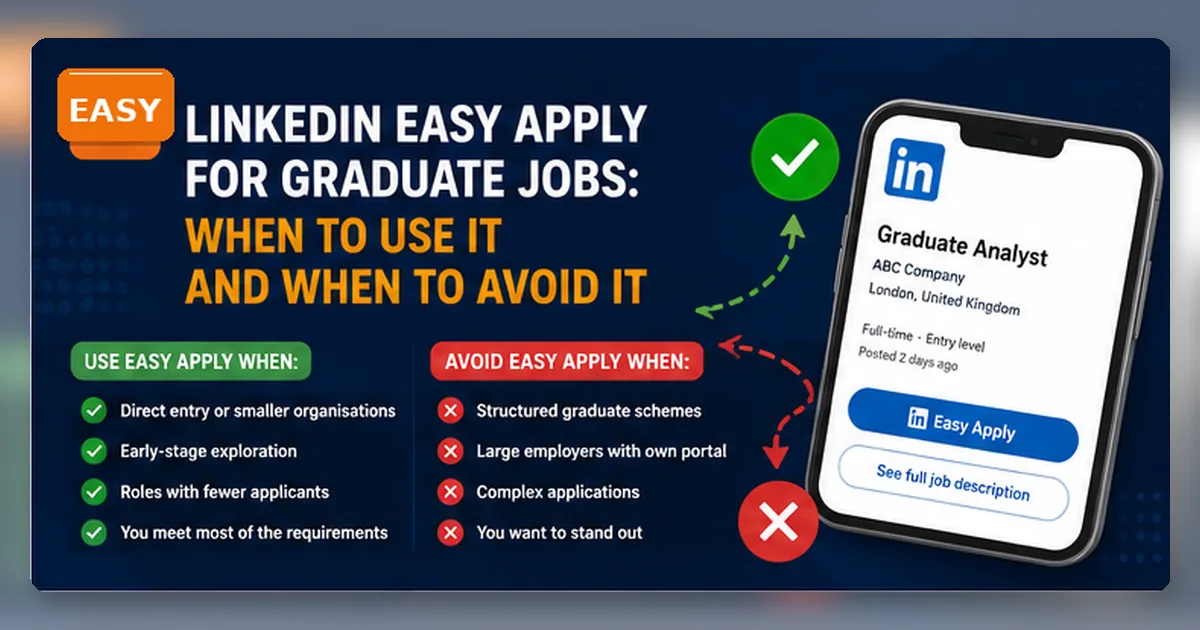
LinkedIn Easy Apply is convenient. That is the problem.
For students applying to graduate jobs in the UK and Ireland, the danger is not that Easy Apply is always bad. The danger is that it feels like progress even when the application is weak, rushed or missing the evidence the employer actually asked for.
Use Easy Apply when speed is genuinely useful. Avoid it when the employer gives a fuller, clearer or more controlled application route on its own website.
Decide whether Easy Apply is the right route
Easy Apply is a tool, not a strategy.
Use it when:
- the role is low-risk or exploratory;
- your LinkedIn profile and CV are already aligned;
- the advert gives enough information to judge fit;
- there is no better employer-site route;
- you are tracking what you sent.
Avoid it when:
- the employer’s own site asks for detailed answers;
- the job looks like a structured graduate scheme;
- you need to tailor your CV carefully;
- you have not read the advert properly;
- you are applying only because it takes one minute.
LinkedIn Help explains that Easy Apply lets you apply on LinkedIn, while an Apply button may send you to the company website or another job board. LinkedIn also explains that once an application is submitted through LinkedIn, you cannot edit or withdraw it through LinkedIn; you need to contact the job poster.
That small detail matters. If your CV was the wrong version, your profile contradicted your application or your answers were rushed, the application has already gone.
For the written application, use this article with GradSharp’s guides to cover letters in 2026, 2:2 graduate schemes and evidence-led CVs.
The decision table
| Situation | Better route | Why |
|---|---|---|
| Large graduate scheme with structured questions | Employer site | You need the official process and full guidance. |
| Smaller employer, simple CV-led role | Maybe Easy Apply | If the advert is clear and your profile is ready. |
| Role asks for a cover letter | Employer site | You need space to tailor properly. |
| You are exploring adjacent roles | Easy Apply can be acceptable | It may help you test the market without overinvesting. |
| The advert redirects to an employer page | Employer site | The employer likely wants you there. |
| Salary, location or visa status is unclear | Employer site or recruiter message first | Do not apply blind if a basic condition may fail. |
The rule is simple: use the route that lets you send the strongest accurate application, not the quickest one.
What Easy Apply actually sends
Easy Apply is not magic. It usually relies on your LinkedIn profile, contact details, CV and any answers the employer asks for inside LinkedIn. That means your profile is part of the application environment.
Before using it, check:
- headline;
- location;
- degree and graduation year;
- experience entries;
- skills;
- CV version;
- phone and email;
- spelling of names, employers and modules.
Students often upload a CV once and forget it. Then they use Easy Apply for roles that require a different CV angle. A finance CV, a marketing CV and a data CV should not all be the same file with one generic paragraph.
When Easy Apply can be sensible
Easy Apply can work when the role is CV-led and the employer has not asked for a detailed application. It can also be useful for early-stage market testing.
For example, a final-year student interested in operations roles might use Easy Apply on a few junior coordinator posts to test whether the CV gets views or replies. But the same student should not use Easy Apply as the main route for a structured graduate programme with competency questions, assessment deadlines and a detailed careers page.
The issue is not morality. It is control.
If the employer site lets you explain evidence, answer motivation questions and check instructions, use it.
When to avoid Easy Apply
Avoid Easy Apply when the role matters and the LinkedIn form gives you too little room.
Red flags include:
- graduate scheme deadline listed on employer website;
- assessment process described outside LinkedIn;
- required cover letter or statement;
- eligibility rules around degree, work rights or location;
- multiple streams with different requirements;
- questions about motivation, values or competencies.
In those cases, LinkedIn should be the discovery tool. The employer site should be the application route.
A better workflow
Step 1: discover on LinkedIn
Search role titles, sectors and locations. Save the role and employer.
Step 2: check the employer page
Open the company careers site. Find the same role if possible. Read deadlines, requirements, salary clues, locations and application steps.
Step 3: choose the route
If the employer site gives more control, apply there. If LinkedIn is the only route and the role is suitable, use Easy Apply after checking your profile and CV.
Step 4: track the application
Record where you applied, which CV you used, the date, the next action and whether you need to follow up.
Common mistakes
The biggest mistake is using Easy Apply to avoid thinking. A student submits twenty applications and feels productive. But if the CV is generic and the roles are poorly matched, the volume hides the problem.
Other mistakes:
- applying twice through LinkedIn and the employer site without knowing whether duplicates matter;
- submitting an old CV;
- ignoring screening questions;
- applying before checking location;
- using Easy Apply for roles that need a tailored answer;
- treating “application viewed” as evidence of strong fit.
Easy Apply pre-flight checklist
Before pressing submit, ask:
- Is this the best route for this employer?
- Is my CV the right version?
- Does my LinkedIn profile match the CV?
- Have I read the full advert?
- Do I meet the obvious requirements?
- Have I saved a record of the application?
- Would I still apply if this took 25 minutes rather than one?
If the answer to the last question is no, skip it.
Audit your last ten LinkedIn applications
Day one: clean your LinkedIn profile and CV library. Rename your CV files by role family: marketing-cv, data-cv, finance-cv, not final-final-cv.
Day two: take ten saved LinkedIn jobs and classify them: Easy Apply, employer site, research first, or reject. Your goal is not more applications. It is better decisions.
FAQ
Is LinkedIn Easy Apply bad for graduate jobs?
No. It is bad when used lazily. It can be fine for some CV-led roles, exploratory applications and smaller employers.
Should I apply on LinkedIn and the employer site?
Usually do not duplicate without a reason. If the employer site is the main route, use that. If you have already applied through LinkedIn and are unsure, contact the employer rather than sending a second confused application.
Can I edit my application after using Easy Apply?
LinkedIn Help says applications submitted through LinkedIn cannot be edited or withdrawn through LinkedIn. You need to contact the job poster.
Should final-year students use Easy Apply during deadline season?
Use it selectively. Deadline season rewards good targeting, not panic-clicking.
Source-checked notes
Checked on 15 June 2026 against LinkedIn Help, UK and Ireland graduate outcome context and UCAS student LinkedIn guidance. Employer requirements can change quickly, so applicants should verify live details on employer pages.