Best UK Graduate Job Boards and Employer Sites: Where Final-Year Students Should Actually Search in 2026
A practical guide to the best UK graduate job boards, employer careers pages and search routines for final-year students applying in 2026.
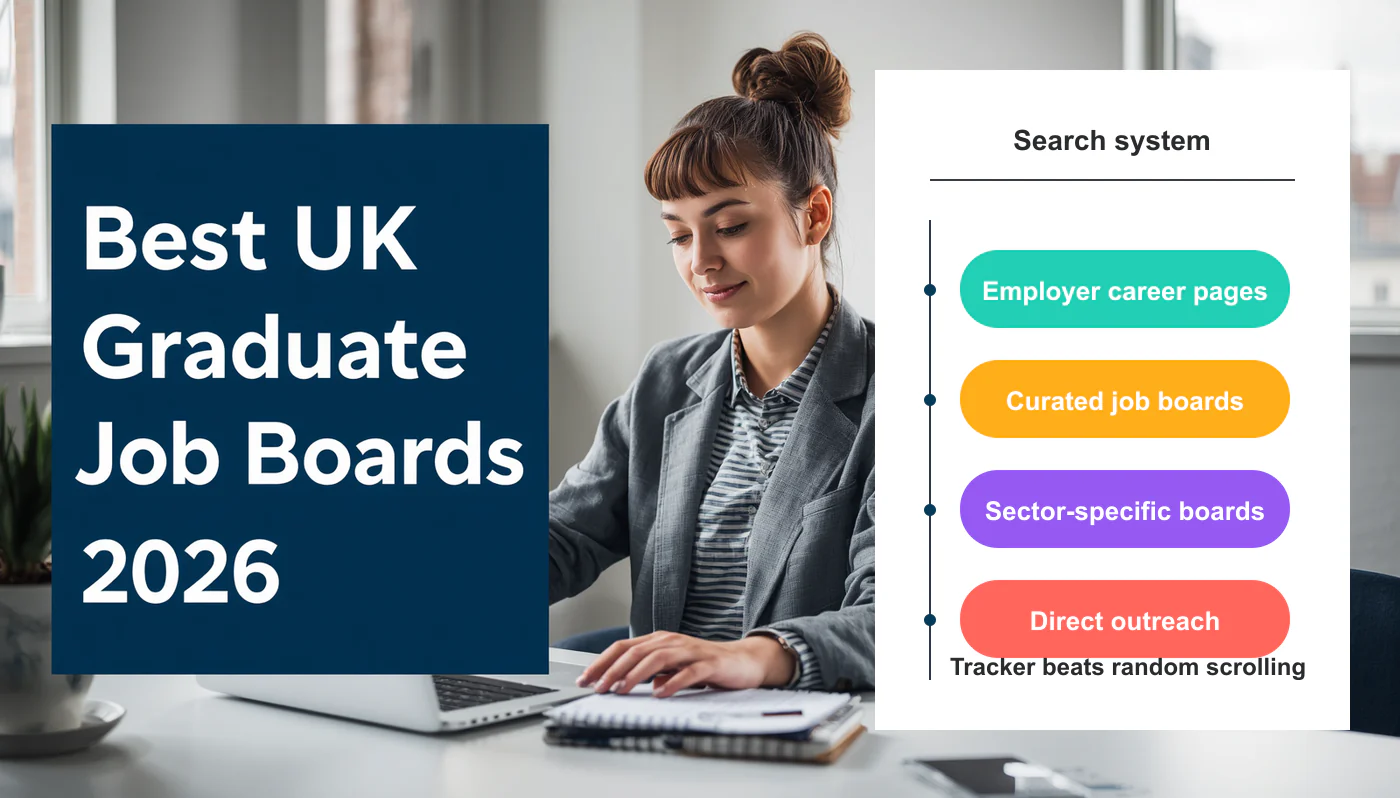
Most final-year students start their job search the same way: they open LinkedIn, type “graduate”, and scroll. A week later, they’ve sent off ten Easy Apply applications, heard nothing back, and feel behind. The problem isn’t effort. It’s that they’re searching in the wrong places for the type of role they actually want.
A graduate scheme at PwC, a six-month assistant role at a local marketing agency, a research post at an NHS trust and a software engineering job at Dyson are all “graduate jobs”, but they live on completely different platforms. Searching one big board for all of them is a guaranteed way to miss the good ones.
This guide explains where to search for what, how to use each platform properly, and how to build a weekly routine that doesn’t fall apart by week three. For the broader question of when to apply during your final year, see GradSharp’s UK final-year student job search timeline.
Where to search first
If you only remember one thing: use the right source for the right type of role.
- Employer careers pages — your number-one source for any priority employer.
- TARGETjobs, Prospects and Bright Network — structured graduate schemes, deadlines, scheme guides.
- Gradcracker — STEM, engineering, science and technology roles.
- Civil Service Jobs and NHS Jobs — public sector routes.
- LinkedIn — alerts, employer research, alumni and recruiter networking.
- Indeed, Reed and Totaljobs — direct-entry, immediate-start and SME roles (with caution).
- University careers portals — exclusive roles, employer events, CV reviews. Often the most underused source.
- Direct outreach — smaller employers, niche teams, local businesses.
You’ll use most of these in parallel. None of them is complete on its own.
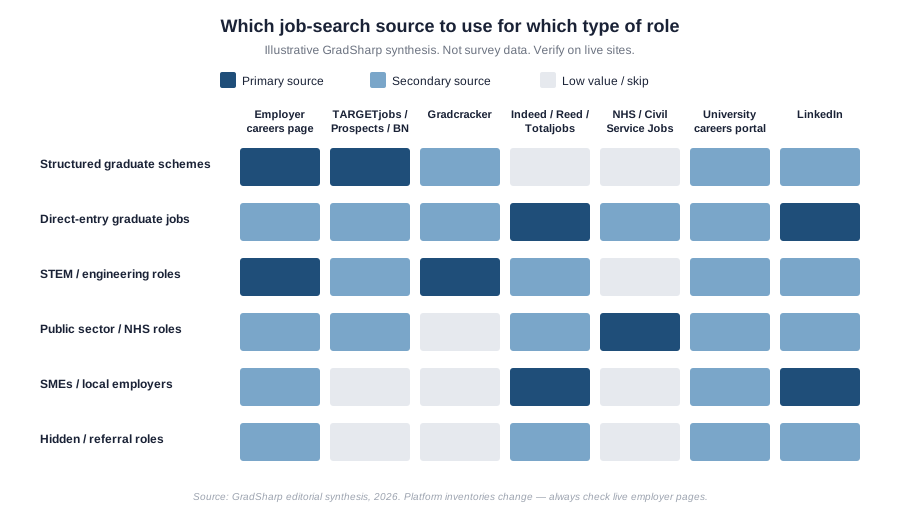
Chart: illustrative GradSharp synthesis. Job-board features and inventories change, so verify on live employer and platform pages.
Why random job searching fails
A few patterns appear over and over in students who feel stuck:
- Duplicate listings. The same role appears on Indeed, Reed, LinkedIn and an aggregator — students apply through whichever appears first, often via a third party rather than the employer.
- Expired adverts. Job boards sometimes leave roles live after the closing date. You apply, never hear back, and assume you’ve been rejected.
- Vague “graduate” titles. Some adverts use “graduate” loosely. The role is actually a commission-only sales job, or a generic admin position that didn’t need a degree at all.
- No sponsorship clarity. International students apply to roles that the employer can’t actually sponsor.
- Easy Apply overuse. Sending the same CV through LinkedIn’s Easy Apply 30 times feels productive. It rarely gets responses.
- Ignoring the employer’s own site. The third-party listing often has less detail, an older closing date, or a generic application route. The employer’s own careers page is the source of truth.
The best job-search sources by purpose
| Source | Best for | Weakness | How to use it properly |
|---|---|---|---|
| Employer careers page | Priority employers, accurate deadlines | You have to know which employers you want | Build a list of 20 target employers and bookmark their careers pages |
| TARGETjobs | Graduate schemes, sector guides | Heavily scheme-focused; less for SMEs | Use it for discovery, then verify on employer site |
| Prospects | Graduate schemes, job profiles, career planning | Same coverage as competitors on big schemes | Useful for “what can I do with my degree” research alongside live roles |
| Bright Network | Graduate schemes, deadlines, events | You need to make a profile | Use the deadline tracker; join events |
| Gradcracker | STEM, engineering, tech, science | STEM only | Filter by your specific discipline, not just “engineering” |
| RateMyPlacement | Internships and industrial placements | Less useful for permanent grad roles | Use during years 1–3, and for spring weeks |
| Alerts, networking, recruiter research | Easy Apply spam, fake roles | Set alerts, follow employers, message thoughtfully | |
| Indeed | Direct-entry, SMEs, immediate-start | Duplicates, expired ads, vague titles | Use specific filters, verify on employer site |
| Reed | Direct-entry, professional services | Recruiter-heavy listings | Treat agency roles with caution; ask who the employer is |
| Totaljobs | Direct-entry, regional roles | Overlapping content with sister sites | Worth a weekly scan, not a daily one |
| Civil Service Jobs | UK government departments | Long application processes | Read the Civil Service behaviours framework before applying |
| NHS Jobs | NHS trusts and healthcare bodies | Trust-specific systems can feel clunky | Set alerts by region and band |
| University careers portal | Exclusive roles, events, support | Often forgotten | Log in weekly while you still have access |
| Specialist sector boards | Charity, creative, finance, tech niches | Variable quality | Use one or two trusted boards per sector |
| Recruitment agencies | Contract and temp roles | Variable communication, fees paid by employers | Be selective; one or two relevant agencies, not ten |
| Alumni and referrals | Insider routes, small teams | Takes time to build | Search LinkedIn for alumni at target employers |
Platform features and inventory change. Always verify what each source actually offers when you visit it.
Employer careers pages: the source of truth
If you only do one thing differently this year, do this: when you see a role advertised anywhere, find that employer’s own careers page and apply there if you can.
Three reasons. First, the employer’s own page usually has the most accurate closing date, eligibility criteria and assessment process. Third-party listings sometimes lag. Second, employer pages often list roles that haven’t been syndicated elsewhere — particularly in the run-up to a deadline. Third, applying directly avoids the friction of a third-party tracking system that may or may not forward your application correctly.
Build a shortlist of 15–20 priority employers early in your search. Bookmark the careers page for each. Check them weekly. This single habit will outperform most other tactics.
If you’re aiming at professional services, our guide on writing a graduate CV for the Big 4 explains what these specific employers look for once you’re on their site.
Graduate platforms: useful but not enough
TARGETjobs, Prospects and Bright Network are the three best-known UK graduate platforms. They each list thousands of schemes and roles, run events, and publish sector guides. They’re particularly strong for autumn-cycle graduate schemes at large employers.
Use them for three things: discovery (finding employers you didn’t know existed), deadline tracking, and sector research. Don’t treat them as your final source — once you find a role, click through to the employer’s careers page and read the original advert. Sometimes the third-party listing summarises away an important requirement, like a specific degree subject or a UK work-rights condition.
A practical note on degree classification: if you have a 2:2, don’t assume the listed “2:1 required” filter is universal. Read our piece on whether a 2:2 blocks you from UK graduate schemes before ruling yourself out.
Sector-specific platforms
For STEM students, Gradcracker is usually the strongest single source. It focuses entirely on science, technology, engineering and maths, and large engineering employers tend to list there. Filter by your specific discipline rather than browsing the homepage.
For healthcare and NHS roles, NHS Jobs (jobs.nhs.uk) is the central listing site for NHS trusts. Roles are organised by Agenda for Change banding and by region. Set up alerts by region and band — generic searches return too much noise.
For UK government roles, Civil Service Jobs (civilservicejobs.service.gov.uk) lists vacancies across departments. The application process uses the Civil Service Success Profiles framework, including “behaviours” written to a specific format. Reading two or three examples before you draft anything will save you several rewrites.
For internships and placements, RateMyPlacement is the standard source, especially for spring weeks, summer internships and industrial placement years.
Beyond these, you’ll find boards for specific sectors — charity roles on CharityJob, tech roles on platforms like Otta or Hired, creative roles on If You Could Jobs and similar. Pick one or two that match your sector. You don’t need to monitor ten.
LinkedIn: powerful but easy to misuse
LinkedIn is the most overused and the most underused job-search tool in the same breath. Students apply through it constantly via Easy Apply, but they rarely use its actually-useful features.
What works on LinkedIn:
- Saved alerts. Set up two or three precise searches (role title + location) and let LinkedIn email you new matches daily.
- Follow target employers. You’ll see when they post roles and when their early-careers team is active.
- Search alumni. Use the alumni tool on your university’s LinkedIn page to find graduates working at your target employers. A short, specific message (“I’m in my final year at [university] studying [subject] — could I ask you two questions about how you got into [employer]?”) works far better than mass connection requests.
- Research the hiring team. Before any interview, look up who’s likely to be on the panel.
- Keep your profile consistent with your CV. Recruiters will check.
What rarely works: applying to 30 roles a day through Easy Apply with a generic CV. Treat LinkedIn as a research and relationships platform first, and a job board second.
Indeed, Reed and Totaljobs: useful for direct-entry roles
These generalist boards are most useful for roles that aren’t structured graduate schemes — assistant positions, coordinator roles, entry-level jobs at SMEs, and immediate-start work that doesn’t follow the autumn recruitment cycle.
They’re also where the noise lives. The same role can appear three times under slightly different titles. Recruitment agencies repost roles to attract candidates. Some adverts have vague salary bands, no named employer, or a description so generic that you can’t tell what you’d actually do.
A few rules:
- If the advert doesn’t name the employer, assume it’s an agency. That’s not always bad, but ask who the end employer is before you commit time.
- If the salary is missing or listed as “competitive” for a junior role, treat that as a yellow flag.
- If the listing looks copied from another site, find the original.
- Tailor your CV before applying. Our guide on cover letters and AI/ATS screening explains why a one-size-fits-all application rarely passes the first filter.
University careers portals
Most universities have a job portal that lists roles employers post specifically to that university. These are often smaller employers, local businesses, and organisations that have an existing relationship with your careers service. The competition is narrower because the audience is narrower.
Your careers service usually also runs CV reviews, mock interviews, employer events, and alumni panels. Many of these are free until 12–24 months after graduation. Check your university’s policy. If you’ve already graduated and didn’t use it, log in now.
International students: add a sponsorship filter
If you’ll need work sponsorship, a job board search alone isn’t enough. You also need to know whether the employer can sponsor a Skilled Worker visa, and whether they’re open to applicants on the Graduate visa route.
Some practical signals to look for on the role page:
- An explicit statement about sponsorship or right to work.
- The employer’s presence on the UK Home Office register of licensed sponsors (publicly available on GOV.UK).
- Wording that says “we welcome applications from all backgrounds” — useful, but not the same as sponsorship.
Don’t rely on the “graduate job” label as a sponsorship signal. Many graduate roles do sponsor; some don’t.
For visa rules, eligibility and salary thresholds, check current GOV.UK Graduate visa and Skilled Worker guidance directly. Rules change, and only GOV.UK is authoritative. GradSharp doesn’t give immigration advice — please consult a qualified adviser for your specific case.
For wider context, see our pieces on international graduates in the UK and Ireland and UK vs Ireland for Indian students.
A practical weekly search routine
A search routine that you can actually keep up with beats an ambitious one that collapses in week two.
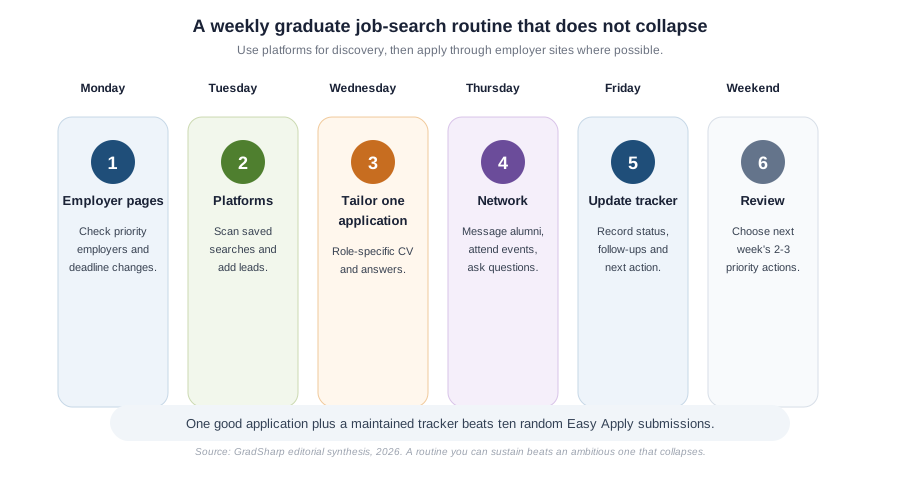
Chart: illustrative GradSharp synthesis. Job-board features and inventories change, so verify on live employer and platform pages.
Two focused hours a day usually beats six unfocused ones.
How to build a job-search tracker
A spreadsheet is enough. Keep one row per application with columns for:
- Employer
- Role title
- Source
- Deadline
- Eligibility (degree, location, work rights)
- Sponsorship note (if relevant)
- Application status
- Next action
- Date followed up
- Notes (recruiter name, assessment date, anything specific)
The point isn’t admin for its own sake. It’s that by week six you’ll have 30+ applications in flight and won’t remember which ones need a follow-up email or which assessment is due Friday.
Red flags in job adverts
Walk away if you see:
- Salary listed as “OTE” or “uncapped commission” for what’s marketed as a graduate role.
- No named employer and no clear description of duties.
- A request to pay for training, equipment, or a “starter pack”.
- Requests for bank details before any interview.
- Pressure to apply immediately or “before the role closes today”.
- Contact only via WhatsApp or a personal Gmail address.
- A description that’s been obviously copied from another listing.
Legitimate employers don’t ask for money and don’t rush you.
Common mistakes
- Relying only on LinkedIn.
- Using one CV for every role.
- Easy-Applying without tailoring.
- Ignoring employer careers pages.
- Missing autumn graduate-scheme deadlines because you started in January.
- Applying to roles you’d refuse if offered.
- Not tracking what you’ve applied to.
- Skipping your university careers service.
Checklist before applying through any platform
- Is the advert current? Check the closing date.
- Is the same role on the employer’s own site? Apply there if you can.
- Is the salary and seniority realistic for a graduate?
- Do you meet the essential (not just desirable) criteria?
- Do you know the assessment process?
- Have you tailored your CV and any cover letter to this role?
- If you need sponsorship, does the advert address it?
Sources checked
This article was checked against public UK graduate recruitment and platform guidance, including TARGETjobs guidance on graduate scheme timing, Prospects graduate scheme guidance, Gradcracker’s STEM-focused graduate job platform, NHS Jobs, Civil Service Jobs and the GOV.UK Register of Licensed Sponsors for international-student sponsorship checks.
Job-board inventories, deadlines and employer sponsorship positions change frequently, so readers should always verify the live advert and employer careers page before applying.
FAQ
What is the best UK graduate job board? There isn’t a single best one. TARGETjobs, Prospects, Bright Network and Gradcracker between them cover most structured graduate schemes. For direct-entry roles, Indeed and Reed are useful. For any specific employer, their own careers page beats all of the above.
Should I apply through LinkedIn or the employer website? Where possible, apply through the employer website. You’ll usually get the most accurate process and the most reliable confirmation.
Is Indeed good for graduate jobs? It’s better for immediate-start and SME roles than for structured graduate schemes. Use it for direct-entry positions, not as your only source.
Are graduate schemes only on specialist platforms? No — most are also listed on the employer’s own careers page, which should be your primary source. The specialist platforms are useful for discovery and deadlines.
How many job boards should I use? Around three to five active sources, plus your 15–20 employer careers pages and your university portal. More than that and you’ll lose track.
What is the best job board for engineering graduates? Gradcracker is the dominant STEM-focused platform in the UK. Most large engineering employers list there alongside their own careers pages.
What should international students check before applying? Whether the employer is a licensed sponsor and whether they accept Graduate-visa applicants. Always confirm visa rules on GOV.UK directly.
Are university careers portals worth using after graduation? Often yes. Many universities allow alumni access for 12–24 months. Check your institution’s policy.
Build a repeatable search routine
- Write down 20 priority employers.
- Find and bookmark each one’s careers page.
- Set up saved searches on three platforms (e.g. LinkedIn, TARGETjobs, and one sector-specific board).
- Build a simple tracker spreadsheet with the columns above.
- Log into your university careers portal.
- Apply to one role properly — tailored CV, employer’s own site — instead of five badly.
Done well, this routine compounds. The students who get offers in spring are usually the ones who built a system in autumn and kept it running.